
3D Learning Hub

DICOM to STL: Simplified steps to create 3D printable models

Key Takeaways

  • DICOM files store detailed medical imaging data used in CT scans, MRIs, and other diagnostic systems
  • STL files represent the surface geometry of objects used for 3D printing
  • Transforming DICOM to STL is not a simple file conversion, it requires medical image segmentation
  • Specialized tools such as 3D Slicer enable professionals to perform CT scan to 3D print workflows
  • Proper segmentation ensures accurate medical modeling and reliable 3D printed anatomical models

    Introduction

    Dicom to STL

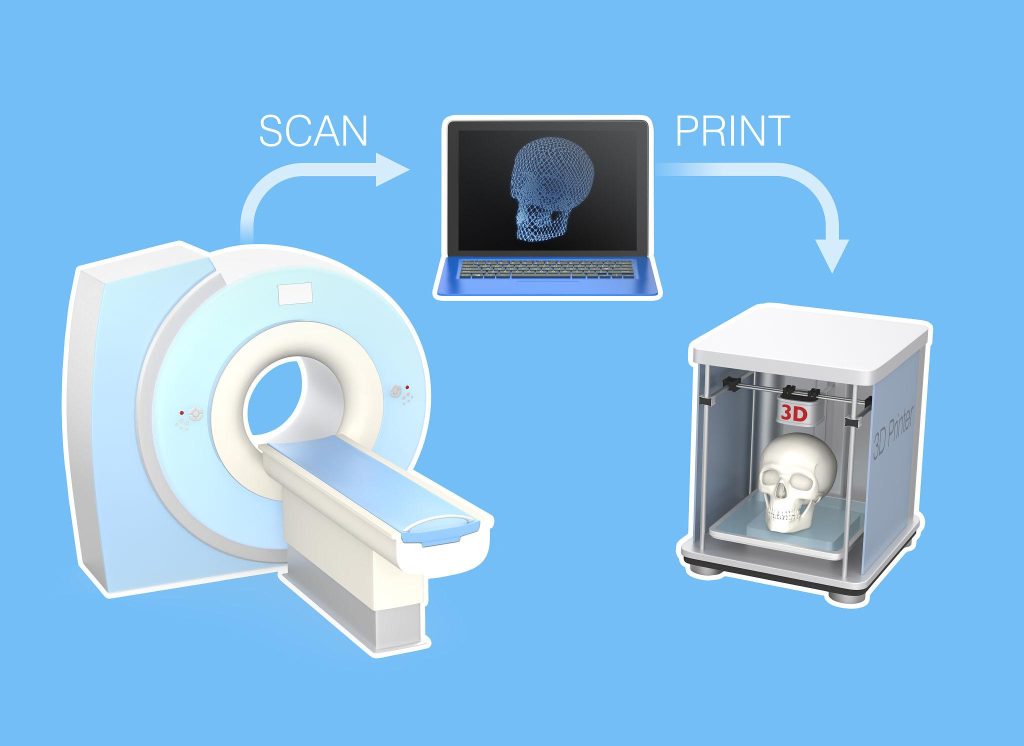
    Medical imaging is no longer confined to 2D screens. Today, hospitals, research labs, and medical schools are increasingly transforming scan data into 3D printed anatomical models that can be held, studied, and used for surgical preparation.

    At the center of this workflow are two key formats: DICOM and STL.

    DICOM (Digital Imaging and Communications in Medicine) is the universal standard used by medical scanners such as CT and MRI systems. STL (Standard Triangle Language), on the other hand, is the most common format used in 3D printing, describing the surface geometry of an object.

    However, moving from DICOM to STL is not as simple as clicking “Save As.” Medical scans contain volumetric data, not ready-to-print geometry. Transforming them into a printable file requires medical image segmentation, the process of isolating anatomical structures from scan data.

    Whether the goal is pre-surgical planning, medical training, or research, creating reliable models depends on two critical steps: precise segmentation and high-quality manufacturing. Once the STL file is generated, industrial additive manufacturing services particularly ISO 13485-certified medical printing services ensure the final model meets the accuracy and safety requirements expected in medical environments.

    What is DICOM?

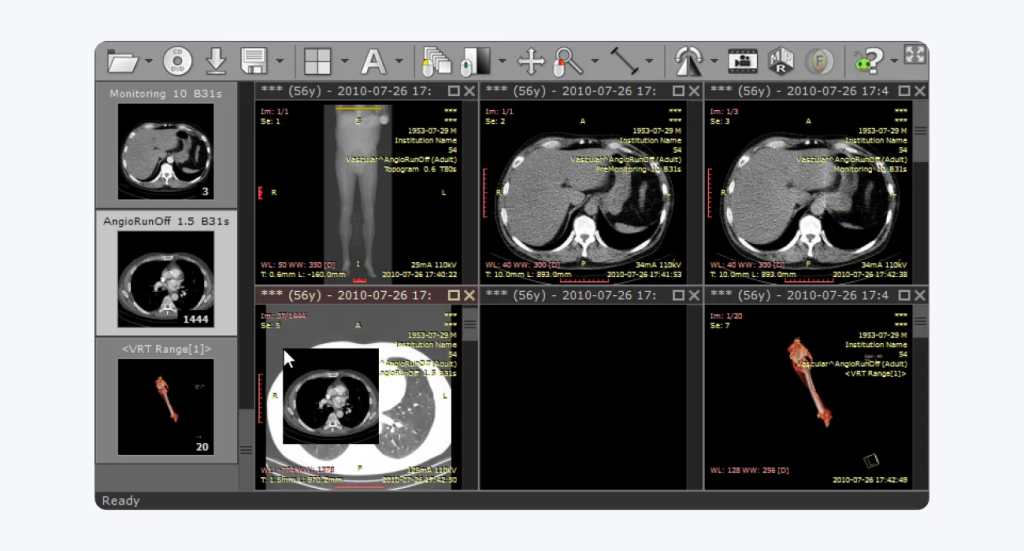
    DICOM (Digital Imaging and Communications in Medicine) is the global standard for storing, transmitting, and managing medical imaging data. Used across hospitals and imaging centers, the format ensures interoperability between scanners, PACS systems, and medical software.

    Unlike standard image formats such as JPEG or PNG, DICOM files contain far more than just images. A single CT scan typically consists of hundreds or thousands of image slices, along with critical metadata including patient information, imaging parameters, and scanner settings.

    Together, these slices form a volumetric dataset composed of voxels (3D pixels). Each voxel stores density information measured in Hounsfield units, which radiologists use to distinguish between materials such as bone, tissue, and air.

    Because of this richness in detail, DICOM datasets are essential for accurate diagnosis and treatment planning. They allow clinicians to visualize internal anatomy in multiple dimensions and share this data across healthcare systems for collaboration and consultation.

    DICOM scan

    What is STL and how is it used in 3D Printing?

    In contrast to DICOM, the STL file format focuses solely on describing the surface geometry of a 3D object.

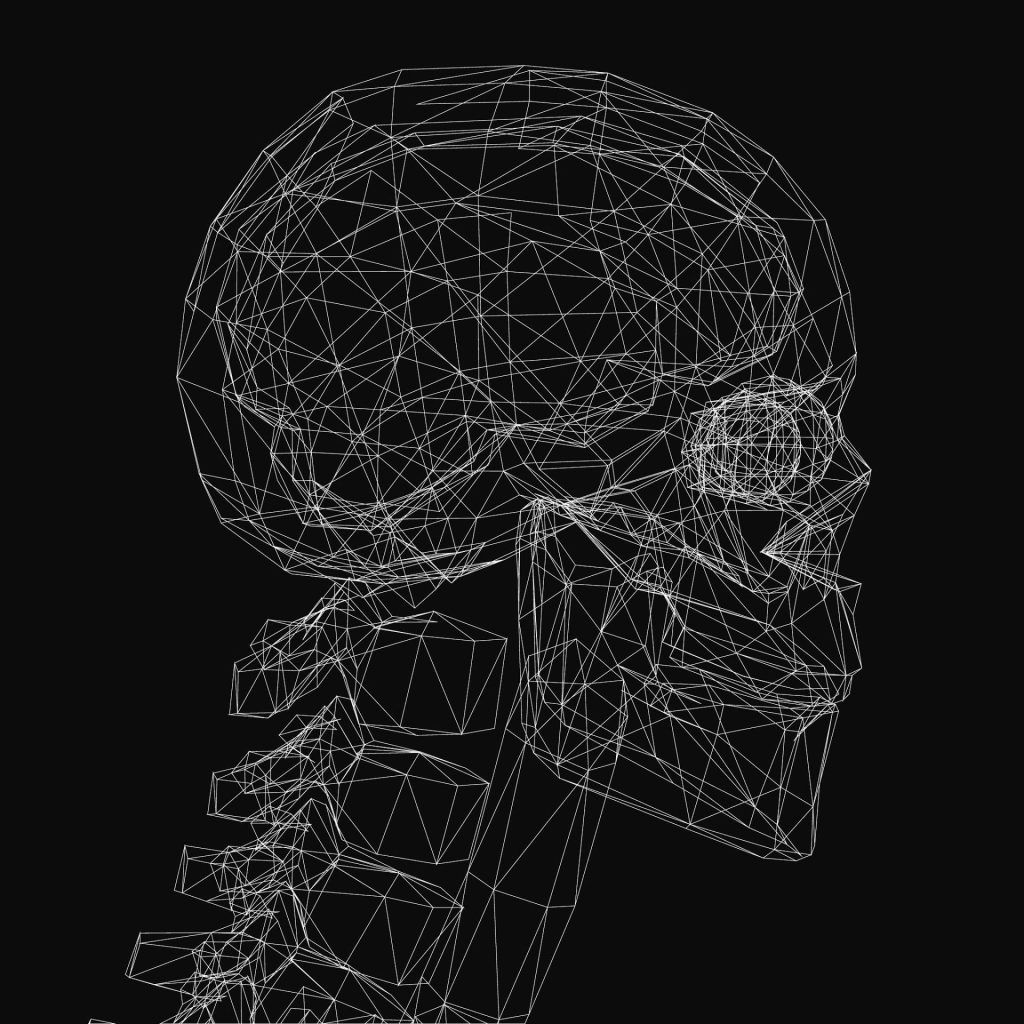
    Instead of storing volumetric imaging data, an STL file represents an object using thousands or sometimes millions of triangular facets that form a surface mesh. This mesh tells a 3D printer exactly where material should be deposited or fused layer by layer.

    Because of its simplicity and universality, STL has become the standard file type used across nearly all 3D printing technologies, including:

    For engineers and designers, STL is the bridge between digital design and physical production. In the medical field, it enables the creation of patient-specific anatomical models, surgical planning tools, and educational replicas.

    Key differences between DICOM and STL formats

    Although both formats are essential in the DICOM to STL workflow, they represent fundamentally different types of data.

    Feature DICOM STL
    File type Medical imaging format used in CT, MRI, and other scans 3D printing format used to manufacture objects
    Data structure Volumetric data made of voxels (3D pixels) Surface mesh made of triangular facets
    Information stored Image slices, Hounsfield units, patient metadata Geometry only (no color, density, or patient data)
    Typical use Medical diagnostics and imaging analysis 3D printing and digital fabrication
    Data complexity Highly detailed medical imaging dataset Simplified 3D printable model
    Workflow role Starting point of the CT scan to 3D print workflow Final file used by 3D printers

    This difference explains why converting DICOM to STL requires segmentation.

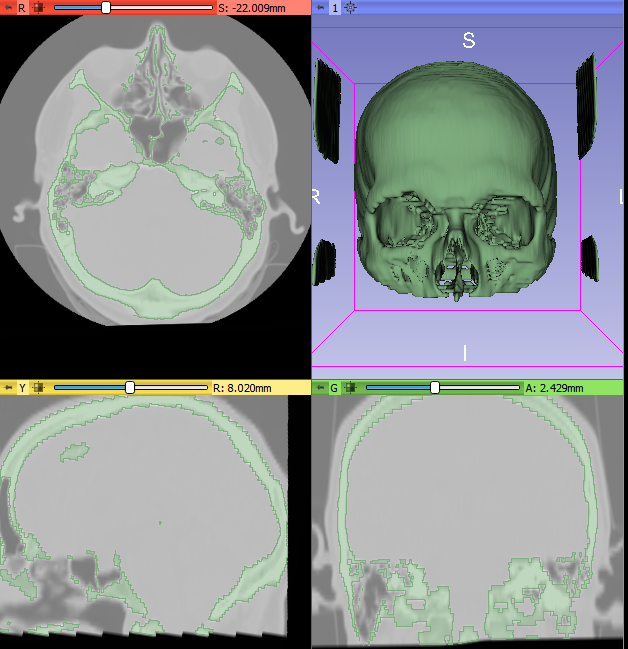
    During segmentation, software analyzes the voxel dataset and selects regions of interest based on density values, often using Hounsfield units. For example, bone structures may be isolated by selecting a density threshold corresponding to calcified tissue.

    The segmentation process then generates a 3D surface mesh, which becomes the STL file used for 3D printed anatomical models.

    Essential tools and software for DICOM to STL conversion

    Because DICOM files contain complex volumetric data, converting them into printable models requires specialized medical modeling software.

    These tools perform several critical tasks:

    • Medical image segmentation

    • Visualization of scan volumes

    • Extraction of anatomical structures

    • Conversion into STL surface meshes

    • Repair and optimization of printable geometry

    Another important consideration is data privacy. Many online “one-click” converters allow users to upload scans and instantly generate STL files. However, uploading patient imaging data to unknown platforms can create serious HIPAA or GDPR compliance risks.

    For clinical or research workflows, it is safer to perform segmentation locally using trusted medical software.

    Recommended software options for conversion

    Several software platforms support the DICOM to STL workflow, each offering different capabilities depending on the complexity of the project and the intended application. Some tools focus on research and open-source medical image segmentation, while others provide clinically validated solutions for advanced medical modeling. Choosing the right software depends on factors such as regulatory requirements, segmentation accuracy, ease of use, and budget.
    The following table compares several widely used tools for performing DICOM to STL segmentation and model generation.

    Software Type Key Strength Typical Users
    3D Slicer Open-source Advanced medical image segmentation and research tools Researchers, bioengineers
    Materialise Mimics Commercial FDA-cleared clinical medical modeling Hospitals, surgical planning teams
    InVesalius Open-source Simple interface for DICOM to STL workflows Students, early research
    ITK-SNAP Open-source Strong segmentation tools for anatomical structures Radiologists, researchers

    Segmenting the DICOM data for accurate modeling

    3d slicer segmentation medical modeling

    Segmentation is the most critical stage in the DICOM to STL workflow.

    During this process, users isolate specific anatomical structures from the scan dataset. This typically begins with thresholding, where density values, expressed in Hounsfield units, are used to separate materials such as bone, soft tissue, or air.

    For example:

    • Bone segmentation often uses higher Hounsfield thresholds

    • Soft tissue requires more refined selection

    • Noise or artifacts must be removed manually

    Additional tools such as region growing allow the software to expand selections to connected voxels belonging to the same structure.

    Accurate segmentation ensures that the resulting STL mesh faithfully represents the patient’s anatomy, an essential requirement for surgical planning, medical research, and training models. Here’s a detailed article on segmentation with Slicer3D

    Checking the STL file for errors

    stl mesh anatomical model triangles

    Once segmentation is complete and the STL file has been generated, it must be inspected and optimized before printing.

    Common mesh problems include:

    • Non-manifold geometry

    • Holes in the mesh

    • Intersecting triangles

    • Thin walls that may fail during printing

    Software tools such as Meshmixer, Blender, Netfabb, or built-in repair functions in medical modeling software can automatically detect and fix these issues.

    Cleaning and validating the mesh ensures the model can be manufactured reliably and reduces the risk of failed prints or inaccurate anatomical replicas.

    Conclusion

    Transforming DICOM scans into STL files enables medical professionals to bring digital imaging into the physical world. Through medical image segmentation, clinicians and engineers can isolate anatomical structures and generate accurate 3D printed anatomical models for research, training, and surgical preparation.

    However, producing reliable models requires more than simply generating an STL file. The quality of segmentation and the capabilities of the 3D printing technology both play a crucial role in achieving accurate results.

    For medical applications, especially those involving patient care, industrial ISO 13485-certified 3D printing services ensure the precision, materials, and manufacturing standards required in healthcare environments.

    By combining robust segmentation software with professional additive manufacturing, the DICOM to STL workflow becomes a powerful tool for advancing medical innovation.

    People Also Ask

    What is DICOM, and why convert it to STL?

    What software do I need for converting DICOM to STL?

    How do I prepare my DICOM files for conversion?

    Can I 3D print my STL file immediately after conversion?

    Get the latest 3D printing news delivered right to your inbox

    Subscribe to our newsletter to hear about the latest 3D printing technologies, applications, materials, and software.